
1 / 4
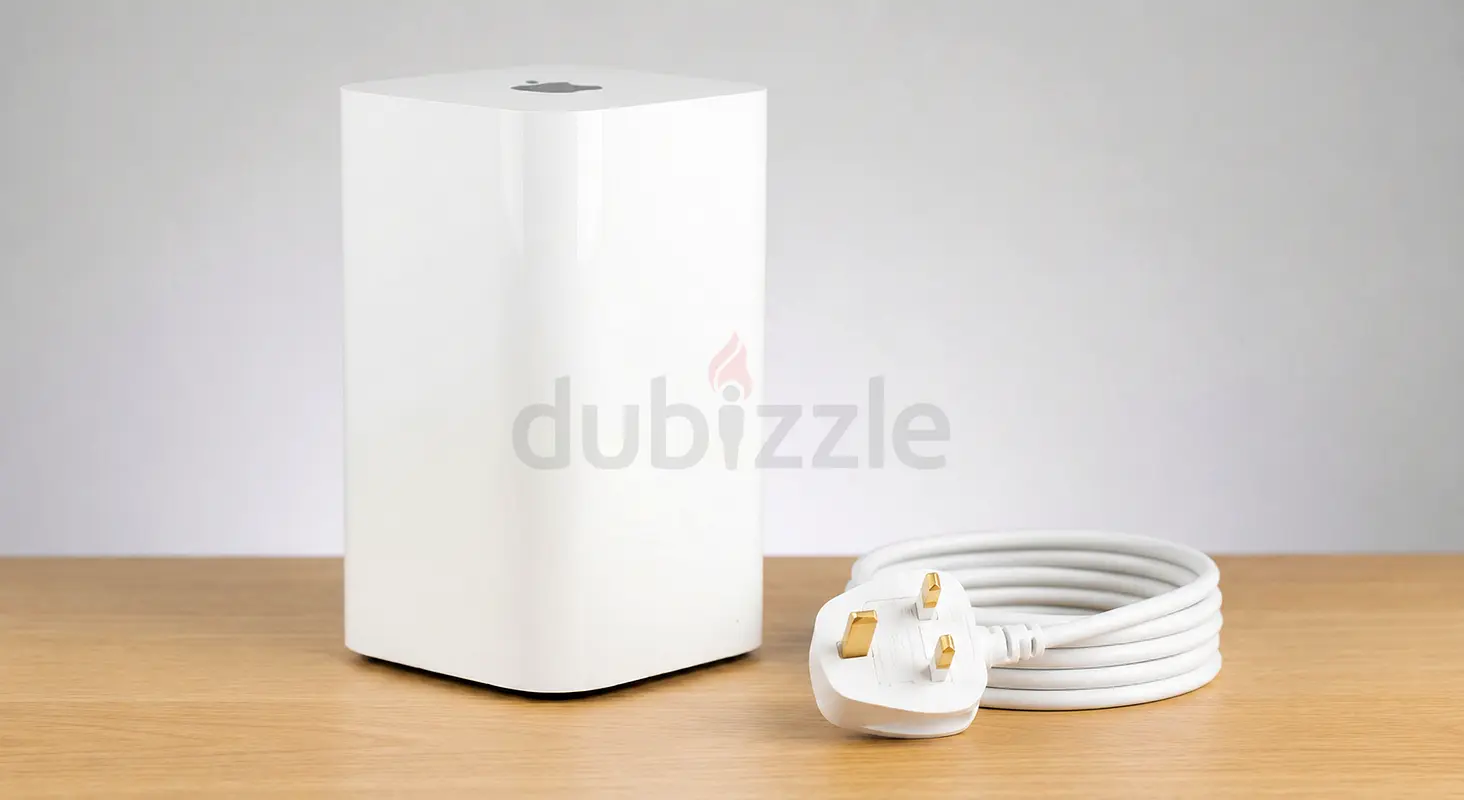
Apple AirPort Extreme 6th Gen (A1521) — Excellent Condition | Free Abu Dhabi Delivery
درهم 140
تفاصيل السلعة
العمر
10 سنوات وأكثر
الحالة
بدون مشاكل أو عيوب ملحوظة
اسم النموذج
Model A1521
مدى الإستخدام
تم الاستخدام مرات قليلة
السنة
2013
الكفالة
لا
نوع التخزين
محركات أقراص فلاش
تقنية الاتصال
إيثرنت, USB, شبكة واسعة (WAN), واي فاي (WiFi)
العلامة تجارية
ابل/ماك
تم النشر بتاريخ: 4 سبتمبر 2026
الوصف
Price: AED 140 — Negotiable
Selling an Apple AirPort Extreme 6th Generation (Model A1521) in excellent working condition.
A reliable and easy-to-use Apple Wi-Fi base station, ideal for creating a wireless network, improving Wi-Fi coverage, connecting wired devices, or using it as an additional access point on an existing network.
The unit is fully functional and factory reset, so it is ready for the new owner to configure.
Highlights:
-----------------
- Apple AirPort Extreme — 6th Generation
- Model A1521
- Fast 802.11ac Wi-Fi
- Simultaneous 2.4GHz & 5GHz dual-band Wi-Fi
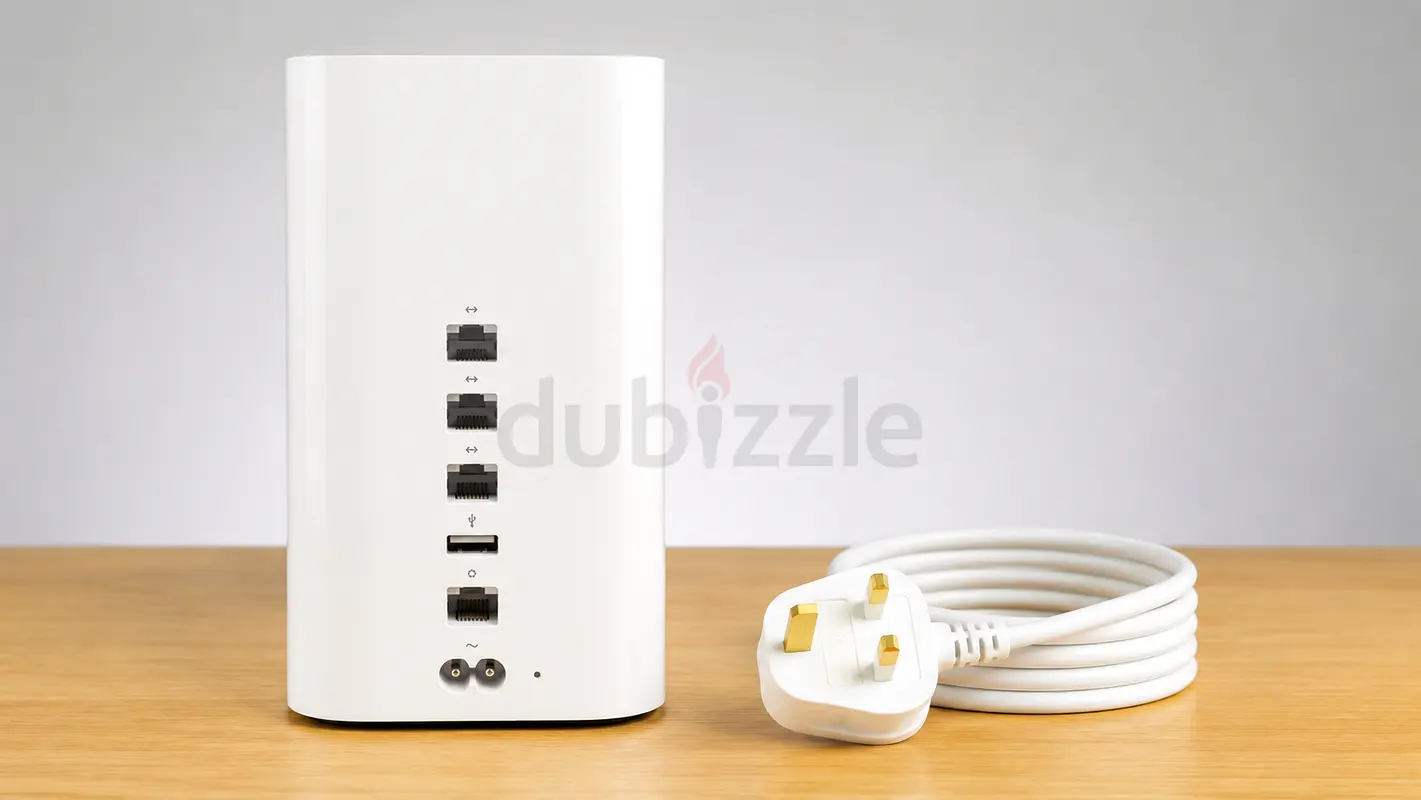
- 3 × Gigabit LAN ports
- 1 × Gigabit WAN port
- USB port for printer/storage sharing
- Clean and well maintained
- Factory reset and ready for setup
What's Included:
------------------------
Apple AirPort Extreme A1521
Original power cable
Delivery / Collection
📍 Abu Dhabi delivery: FREE
📍 Collection from my place: FREE
🚚 Shipping to other Emirates: AED 40
Buyer can inspect the unit upon collection/delivery (1 day warranty for testing).
Price: AED 150 (negotiable).
Reasonable offers are welcome.
Please message me if interested.
Startup User Guide for the Buyer:
-------------------------------------------------
Apple AirPort Extreme — Quick Startup Guide
Step 1 — Connect the AirPort Extreme
Connect the power cable to the AirPort Extreme and plug it into a wall outlet.
Step 2 — Connect Your Internet
Connect an Ethernet cable from your internet modem/router to the AirPort Extreme's WAN port — the port marked with the circle icon.
Step 3 — Wait for Startup
Allow approximately one minute for the AirPort Extreme to start.
Step 4 — Open AirPort Utility
On an Apple device, open AirPort Utility.
On iPhone/iPad, it can be downloaded from the App Store if it is not already installed.
Step 5 — Select the AirPort Extreme
AirPort Utility should detect the new AirPort Extreme and guide you through the setup process.
Step 6 — Create Your Network
Follow the setup instructions to choose:
Wi-Fi network name
Wi-Fi password
Base station name
Router/network settings
Step 7 — Complete Setup
Save the settings and allow the AirPort Extreme a few moments to restart.
Your Wi-Fi network should then be ready to use.
Important Note:
The AirPort Extreme is an older Apple networking product, so AirPort Utility may look slightly different depending on the Apple device and operating-system version.
If you are connecting it to an existing router, you can configure the AirPort Extreme to operate as an additional access point/bridge rather than creating a second separate router network.
Selling an Apple AirPort Extreme 6th Generation (Model A1521) in excellent working condition.
A reliable and easy-to-use Apple Wi-Fi base station, ideal for creating a wireless network, improving Wi-Fi coverage, connecting wired devices, or using it as an additional access point on an existing network.
The unit is fully functional and factory reset, so it is ready for the new owner to configure.
Highlights:
-----------------
- Apple AirPort Extreme — 6th Generation
- Model A1521
- Fast 802.11ac Wi-Fi
- Simultaneous 2.4GHz & 5GHz dual-band Wi-Fi
- 3 × Gigabit LAN ports
- 1 × Gigabit WAN port
- USB port for printer/storage sharing
- Clean and well maintained
- Factory reset and ready for setup
What's Included:
------------------------
Apple AirPort Extreme A1521
Original power cable
Delivery / Collection
📍 Abu Dhabi delivery: FREE
📍 Collection from my place: FREE
🚚 Shipping to other Emirates: AED 40
Buyer can inspect the unit upon collection/delivery (1 day warranty for testing).
Price: AED 150 (negotiable).
Reasonable offers are welcome.
Please message me if interested.
Startup User Guide for the Buyer:
-------------------------------------------------
Apple AirPort Extreme — Quick Startup Guide
Step 1 — Connect the AirPort Extreme
Connect the power cable to the AirPort Extreme and plug it into a wall outlet.
Step 2 — Connect Your Internet
Connect an Ethernet cable from your internet modem/router to the AirPort Extreme's WAN port — the port marked with the circle icon.
Step 3 — Wait for Startup
Allow approximately one minute for the AirPort Extreme to start.
Step 4 — Open AirPort Utility
On an Apple device, open AirPort Utility.
On iPhone/iPad, it can be downloaded from the App Store if it is not already installed.
Step 5 — Select the AirPort Extreme
AirPort Utility should detect the new AirPort Extreme and guide you through the setup process.
Step 6 — Create Your Network
Follow the setup instructions to choose:
Wi-Fi network name
Wi-Fi password
Base station name
Router/network settings
Step 7 — Complete Setup
Save the settings and allow the AirPort Extreme a few moments to restart.
Your Wi-Fi network should then be ready to use.
Important Note:
The AirPort Extreme is an older Apple networking product, so AirPort Utility may look slightly different depending on the Apple device and operating-system version.
If you are connecting it to an existing router, you can configure the AirPort Extreme to operate as an additional access point/bridge rather than creating a second separate router network.
منطقة
مدينة خليفة, أبو ظبي, الإمارات

- المحاسبة / المالية
- السيارات
- الصحة والجمال
- التنظيف /التدبير المنزلي
- الإنشاءات
- شيف / طباخ
- خدمة العملاء / مركز الإتصال
- إدارة وتحليل البيانات
- التصميم
- سائق / توصيل
- تعليم
- هندسة
- إدارة الفعاليات والمناسبات
- عامل / فنّي
- الموارد البشرية - الإدارة
- تكنولوجيا المعلومات
- خدمات قانونية
- خدمات لوجستية و توزيع
- التصنيع / التخزين
- كابتن بحري / بحار
- التسويق/الإعلان
- الاعلام,الفنون والترفيه
- الطب / الرعاية الصحية
- عقارات
- تشغيل المطاعم
- المبيعات / تطوير الأعمال
- السكرتارية / المكتب الأمامي
- الأمن /الحماية
- رياضة و لياقة
- السفروالضيافة
- أخرى
- يبحث عن عمل
English